Yes, there is a real chance you are. Most accidental AI crawler blocks don’t come from a decision anyone made. They come from a robots.txt rule written for one bot that catches another, a CDN default that changed on 15 September 2026, a firewall that returns 403 to anything calling itself a bot, or a JavaScript page that AI crawlers can’t read.
I found out the hard way. This week an AI assistant tried to read pages on my own playbook for research, and my own robots.txt turned it away. I write about AI search for a living, and my site was saying “no” to the tools I want to be cited in.
This guide shows you the five places a block can hide, how to check each one in about 15 minutes, and which bots you should let in.

Key takeaways
- Every big AI company runs separate bots for training, search indexing and live user fetches, and each one needs its own robots.txt rule.
- Blocking a training bot like GPTBot keeps you out of model training, and your ChatGPT search visibility is unaffected, as long as OAI-SearchBot stays allowed.
- In a September 2026 census of the top 5,000 sites, 238 sites that blocked GPTBot also blocked OAI-SearchBot, which most likely cost them ChatGPT citations by accident.
- Cloudflare changed its AI bot controls on 15 September 2026, and its “Block” setting for training now also stops Googlebot, Bingbot and Applebot.
- About two in five robots.txt bans on GPTBot are never enforced, and some sites block GPTBot at the firewall while their robots.txt says it is welcome.
- GPTBot and ClaudeBot do not run JavaScript, so client-side rendered content is invisible to them.
- Google’s AI Overviews use Googlebot, so blocking Google-Extended does not remove you from AI Overviews.
What does “blocking AI crawlers” actually mean?
Blocking an AI crawler means any setting on your site that stops an AI company’s bot from fetching or reading a page. That includes robots.txt rules, CDN bot settings, firewall rules, rate limits, bot challenges and content the bot can’t render. A bot is blocked whenever it cannot read what a human visitor can read.
Most people picture one switch. In practice, there are three kinds of AI bot, and they do very different jobs.
| Bot type | What it does | Example tokens | What blocking it costs you |
|---|---|---|---|
| Training crawler | Collects pages to train or fine-tune AI models. | GPTBot, ClaudeBot, Google-Extended, Applebot-Extended, CCBot | Your content stops feeding future models. Search visibility is unaffected. |
| Search crawler | Builds an index so an AI search product can cite you later. | OAI-SearchBot, Claude-SearchBot, PerplexityBot, Googlebot | You lose citations and links in AI answers. |
| User fetcher (agent) | Visits a page live because a person asked about it. | ChatGPT-User, Claude-User, Perplexity-User | The assistant can’t read your page when a user pastes your link or asks about you. |
Cloudflare now uses the same three buckets. It calls them Search, Agent and Training in its July 2026 announcement of new AI traffic controls.
This distinction is the whole game. A training block is a business decision you can make safely. A search or agent block is usually an accident, and it’s the one that makes you invisible.
If you are new to the idea of being cited by AI engines, start with my explainer on what AI SEO is and how it works. This article assumes you already want to be cited and need to check that nothing is stopping it.
Why do accidental AI crawler blocks matter more in 2026?
Accidental blocks matter more now because AI answers have become a real discovery channel, and the bots that feed them are a growing share of all web traffic. A block that was harmless in 2023 can now remove you from ChatGPT, Claude and Perplexity answers for your own brand name.
Three numbers explain the shift.
- Bots overtook humans on the web in 2026, with automated requests making up 57.5% of HTML traffic, according to Cloudflare Radar data summarised by Digital Applied.
- Only 9.3% of AI crawler requests in May 2026 were for search, with 51.8% for training and 35.7% mixed.
- Search-purpose bots are the ones that can send you a click, so they are the ones worth protecting.

That split is why so many site owners reach for a blanket block. Training crawlers take a lot and give little back.
On the trailing 28 days to 1 August 2026, Cloudflare Radar’s crawl-to-refer ratio put Anthropic at 1,782 pages crawled per referral, Perplexity at 303, OpenAI at 233, Microsoft at 37 and Google at 4.79, as reported by The Growth Spice. The ratios move fast. Anthropic’s fell by roughly 60% in two months as its products started sending more traffic back.
The frustration is fair. A blanket block is still the wrong answer for most businesses, because it throws out the search bots along with the training bots.
| What you want | What a blanket “block AI” does | What a targeted policy does |
|---|---|---|
| Keep content out of model training. | Achieved. | Achieved. |
| Get cited in ChatGPT, Claude and Perplexity answers. | Lost. | Kept. |
| Let AI assistants read a link a user pastes. | Lost. | Kept. |
| Stay in Google Search and AI Overviews. | At risk on Cloudflare since 15 Sept 2026. | Kept. |
I cover the bigger picture of how answer engines differ from Google in AI search vs Google search: what’s changing. The short version: AI engines pick a handful of sources per answer. If a bot can’t reach you, you aren’t even in the running.
Which AI crawlers should you know in 2026?
The AI crawlers that matter most in 2026 come from OpenAI, Anthropic, Perplexity, Google and Apple, and each company splits its bots by job. You need to know the exact token for each one, because robots.txt matches on these names.

Here is the full cheat sheet, with what each company says about its own bots.
| Company | Token | Job | Honors robots.txt? | Source |
|---|---|---|---|---|
| OpenAI | GPTBot | Training | Yes. | OpenAI crawler docs |
| OpenAI | OAI-SearchBot | ChatGPT search index | Yes. Changes take about 24 hours. | OpenAI publisher FAQ |
| OpenAI | ChatGPT-User | Live fetch for a user | OpenAI warns robots.txt rules may not apply. | Search Engine Journal |
| Anthropic | ClaudeBot | Training | Yes. | Claude Help Center |
| Anthropic | Claude-SearchBot | Claude search index | Yes. | Claude Help Center |
| Anthropic | Claude-User | Live fetch for a user | Yes. | Claude Help Center |
| Perplexity | PerplexityBot | Perplexity search index | Yes. | Perplexity crawler docs |
| Perplexity | Perplexity-User | Live fetch for a user | Generally ignores robots.txt, per Perplexity. | Perplexity crawler docs |
| Googlebot | Search, AI Overviews, AI Mode | Yes. | Google Search Central | |
| Google-Extended | Control token for Gemini training and grounding | Yes. | Google crawler list | |
| Apple | Applebot-Extended | Control token for Apple model training | Yes. | Apple support |
| Common Crawl | CCBot | Open web archive used for training | Yes. | Common Crawl |
A few details in that table catch people out.
- Anthropic’s older tokens, Claude-Web and anthropic-ai, are deprecated, so rules that only name them no longer do anything useful.
- Anthropic says its bots will not try to bypass CAPTCHAs, so a bot challenge on your site stops Claude cold.
- OpenAI notes that if it finds a disallowed URL elsewhere, ChatGPT may still show the bare link and title, and only a
noindextag prevents that. - Google-Extended is a control token with no crawler of its own, so it never shows up in your server logs.
In the rest of this guide, I’ll walk through the five layers from the infographic at the top, in the order a request hits them.
Layer 1: Is your robots.txt blocking AI search bots by mistake?
robots.txt is the most common place for an accidental AI block, because one rule written for a training bot often catches a search bot too. The fix is to give each bot its own group, and to read your live file rather than the copy in your CMS.
The September 2026 data is blunt. Reese Calder fetched robots.txt from the Tranco top 5,000 sites on 7 September 2026 and got a file from 2,771 of them. His robots.txt census on DEV Community found:
| Finding | Number |
|---|---|
| Sites blocking at least one AI training crawler. | 25.2% |
| Sites blocking at least one AI search crawler. | 13.3% |
| Sites blocking GPTBot. | 535 |
| GPTBot blockers that also block OAI-SearchBot. | 238 (44.5%) |
| Sites visible to Googlebot but blocking an AI search crawler. | 296 |
| Sites blocking Googlebot. | 2.8% |

The author’s own read is that most of the 238 look like “an accidental catch-all rather than a decision anyone made on purpose.” For large platforms, a block can be a licensing choice. For a SaaS blog, it’s almost always a mistake.
The six robots.txt mistakes behind most accidental blocks
These are the patterns that cause accidental AI blocks. Each one is easy to spot once you know it.
Mistake 1. A wildcard group that disallows everything.
User-agent: *Disallow: /
This blocks every bot that doesn’t have its own group, including every AI search bot. It usually survives from a staging site. Check that your live file doesn’t contain it.
Mistake 2. One group listing training and search bots together.
User-agent: GPTBotUser-agent: OAI-SearchBotUser-agent: ClaudeBotUser-agent: Claude-SearchBotDisallow: /
Someone copied a “block AI” list from a blog post. It blocks training, and it also blocks both search indexes. Split training tokens and search tokens into separate groups.
Mistake 3. Assuming a named group inherits the wildcard rules.
A bot that finds a group with its own name follows only that group. It ignores the User-agent: * rules entirely. If you give OAI-SearchBot its own group with Allow: /, your wildcard Disallow: /admin/ no longer applies to it. Repeat any rules you want in every named group.
Mistake 4. Blocking the wrong Google token.
Blocking Google-Extended to “get out of AI Overviews” does nothing to AI Overviews. Blocking Googlebot to “stop AI” removes you from Google Search. More on this in Layer 5.
Mistake 5. Blocking CSS, JavaScript or image folders.
Old robots.txt files often disallow /wp-includes/, /assets/ or /js/. Google needs these to render your pages. Rendered content is what Google uses for AI Overviews too.
Mistake 6. A robots.txt that bots can’t fetch at all.
This one is new. HasData found that 125 Cloudflare sites served their robots.txt in July and refused it in September 2026, because the file itself sat behind a bot challenge. As HasData put it, “a file behind a bot challenge is a file no crawler can obey.”
| Mistake | What it breaks | Fix |
|---|---|---|
User-agent: * with Disallow: /. | All AI search and fetch bots. | Remove it or scope it to private paths. |
| Training and search bots in one group. | ChatGPT, Claude and Perplexity citations. | Separate groups for training and search. |
| Named group without repeated rules. | Private paths now open to that bot. | Copy needed Disallow lines into each group. |
| Google-Extended used to exit AI Overviews. | Nothing, which is the problem. | Use snippet controls instead. |
| Asset folders disallowed. | Rendering in Google and AI Overviews. | Allow CSS, JS and image paths. |
| robots.txt behind a challenge. | Every compliant crawler. | Exempt /robots.txt from challenges. |
When you fix robots.txt, you are fixing the permission layer. You are not yet fixing whether the bot actually gets in. That’s the next three layers.
Layer 2: Did Cloudflare’s September 2026 change block AI bots for you?
If your site runs through Cloudflare, your AI bot settings may have changed on 15 September 2026 without you touching anything. Cloudflare replaced its old one-click “Block AI bots” setting with separate Search, Training and Agent controls, and it changed what “Block” means.
Cloudflare sits in front of more than 20% of web domains, according to Cloudflare itself. HasData measured 26% of the top 10,000 sites behind its proxy. If you’re on it, this layer matters.
What changed on 15 September 2026
Cloudflare’s 15 September 2026 post on accountable mixed-use crawlers lists the changes.
- “Block” and “Block on pages with ads” for Training now apply to mixed-use crawlers, including Googlebot, Bingbot and Applebot.
- A new setting, “Disallow AI Training”, stops training while keeping search bots allowed.
- The old “Block AI Bots” toggle is deprecated.
- The old Managed robots.txt feature is replaced by Bot Preference Sync.
Here are the four Training settings, side by side.
| Training setting | What happens to training-only bots | What happens to Googlebot, Bingbot, Applebot |
|---|---|---|
| Allow | Allowed. | Allowed. |
| Disallow AI Training | Blocked. A no-training preference is written to robots.txt. | Still allowed for search. |
| Block on pages with ads | Blocked on ad pages. | Blocked on ad pages, search included. |
| Block | Blocked everywhere. | Blocked everywhere, search included. |
Cloudflare is direct about it: selecting Block “will stop Applebot, Bingbot, and Googlebot from reaching your site, search included.” If your goal is to stop training and keep search, you want Disallow AI Training.
How old settings were migrated
Most existing sites were moved over automatically. The part people miss is the Agent column.
| Your legacy “Block AI bots” setting | New Search | New Training | New Agent |
|---|---|---|---|
| Off | Allow | Allow | Allow |
| Block | Allow | Disallow AI Training | Block on pages with ads |
| Block on pages with ads | Allow | Disallow AI Training | Block on pages with ads |
If you ever turned on the old block, the Agent category is now set to “Block on pages with ads.” Agents include ChatGPT-User and Claude-User. So on any page that shows ads, those assistants can no longer fetch your content when a user asks about it.
The robots.txt lines that quietly disappeared
HasData re-measured 10,894 sites on 16 September 2026 for its AI Crawler Block Index. Among Cloudflare sites, the share disallowing GPTBot in robots.txt fell from 17.1% to 9.9%. On non-Cloudflare sites it barely moved (18.7% to 18.6%).
The reason: Cloudflare’s managed robots.txt block was removed, and its replacement, Bot Preference Sync, asks existing customers to review and confirm before it writes anything. Until you confirm, your robots.txt may say nothing while your edge still blocks.
Your Cloudflare checklist
- Open your zone’s Security settings and find the Search, Training and Agent controls.
- Set Search to Allow unless you have a specific reason not to.
- Set Training to Disallow AI Training if you want out of training, and avoid Block unless you also want out of Google.
- Check the Agent setting, and set it to Allow if you want assistants to read pages users ask about.
- Confirm Bot Preference Sync so your robots.txt matches your edge rules.
- Make sure
/robots.txtis not behind a challenge.
Layer 3: Is your firewall silently blocking AI crawlers?
A firewall, rate limit or bot challenge can block an AI crawler even when your robots.txt says it’s welcome. This is the hardest layer to spot, because nothing in your robots.txt or CMS tells you it’s happening.
HasData’s live test sent the same request from the same datacenter IP twice: once as Chrome, once as GPTBot. The gap is the block.

| Group | Browser served | GPTBot served | Gap |
|---|---|---|---|
| News publishers, July 2026. | 83.8% | 54.2% | 29.6 points |
| News publishers, Sept 2026. | 83.1% | 47.2% | 35.9 points |
| Top web, July 2026. | 72.3% | 67.8% | 4.5 points |
| Top web, Sept 2026. | 73.9% | 68.6% | 5.3 points |
The same study found that robots.txt and enforcement often disagree, in both directions.
- 39.5% of sites that disallow GPTBot in robots.txt still served it a normal page.
- 115 sites in July, and 178 in September, blocked GPTBot at the edge even though robots.txt allowed it.
- 8.2% of enforcement responses were JavaScript challenges or interstitials, which a crawler can’t solve.
That second group is the one I worry about for SaaS and B2B sites. Your robots.txt looks perfect. Your security team’s WAF rule says no.
What “blocked” looks like depends on your CDN

| CDN | GPTBot served | Hard-blocked | JS challenge | Rate-limited |
|---|---|---|---|---|
| CloudFront | 78.5% | 14.4% | 0.0% | 0.0% |
| Cloudflare | 51.3% | 16.9% | 24.7% | 0.5% |
| Akamai | 39.1% | 34.5% | 0.0% | 19.5% |
| Fastly | 27.3% | 61.5% | 0.0% | 0.6% |
Source: HasData, 2,096-site enforcement test. Most of these are deliberate choices by publishers. The point is that your CDN’s defaults shape the outcome, so check them.
The status codes to look for
| Status code | What it means for an AI bot | Common cause |
|---|---|---|
| 200 | Page served. | Nothing to fix. |
| 403 / 401 | Hard block. | WAF rule matching the bot’s user agent. |
| 402 | Payment required. | Cloudflare pay per crawl. |
| 429 | Too many requests. | Rate limit tuned for humans, hit by a crawler. |
| 503 or challenge page | Bot can’t pass. | Bot fight mode, “under attack” mode, Turnstile. |
A note on Perplexity. In August 2025, Cloudflare delisted Perplexity from its verified bots after reporting undeclared crawlers that ignored robots.txt. Perplexity disputed the report. Either way, if you want Perplexity citations, Perplexity’s own docs tell you to add explicit WAF allow rules for its published IP ranges.
Layer 4: Can AI crawlers read your JavaScript?
Most AI crawlers can’t read content that only appears after JavaScript runs. If your pages are client-side rendered, GPTBot and ClaudeBot see an almost empty page, even when they’re fully allowed.
This is the block nobody configures. It comes from how your site is built.
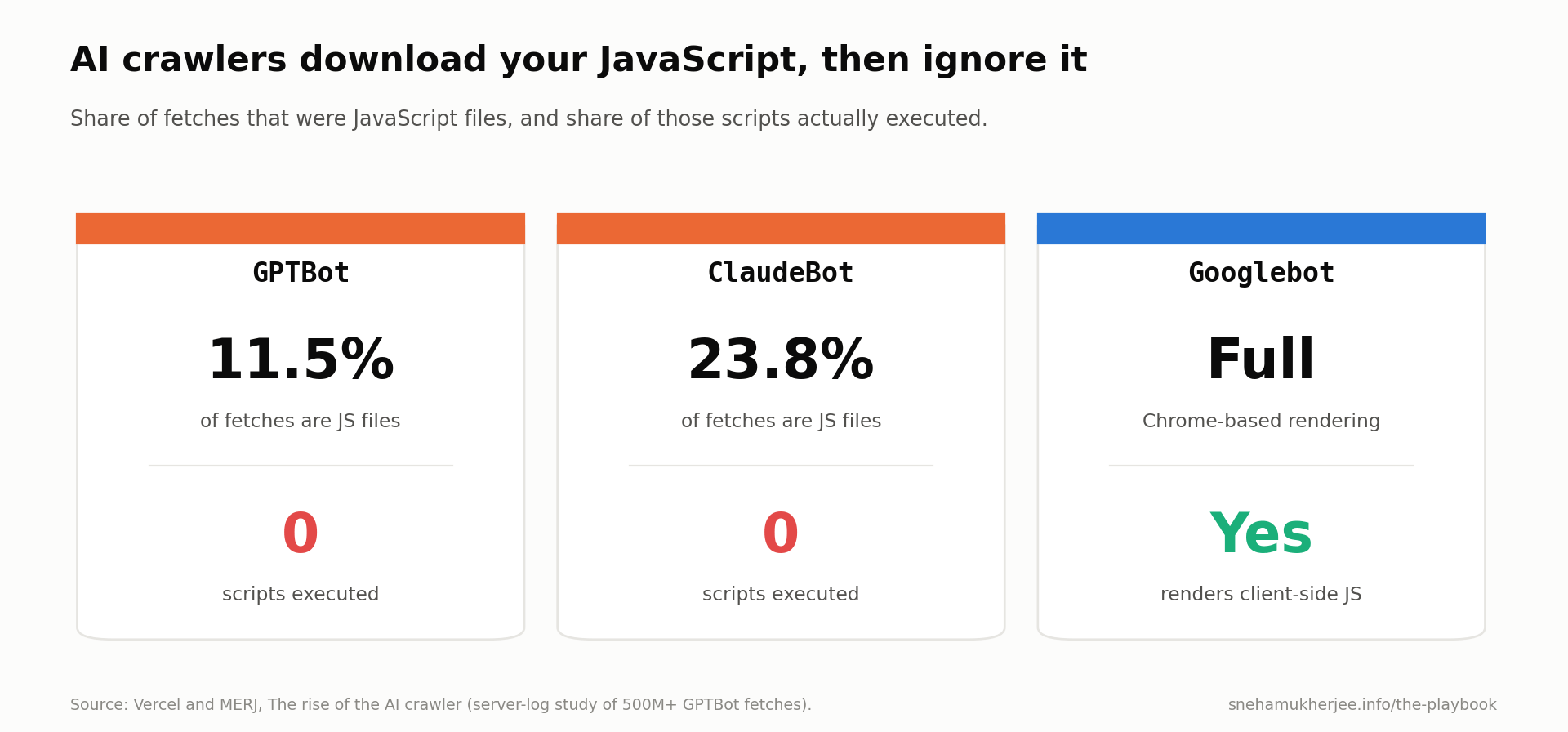
Vercel and MERJ analysed AI crawler traffic across Vercel’s network and found that none of the major AI crawlers render JavaScript.
| Crawler | Fetches JS files | Executes JS | What it reads |
|---|---|---|---|
| GPTBot (OpenAI) | 11.5% of requests | No | Raw HTML only. |
| ClaudeBot (Anthropic) | 23.8% of requests | No | Raw HTML only. |
| PerplexityBot | Not measured | No | Raw HTML only. |
| Googlebot | Yes | Yes | Fully rendered page. |
| Applebot | Yes | Yes | Fully rendered page. |
The same study found ChatGPT’s and Claude’s crawlers hit 404 pages in over 34% of fetches, against about 8% for Googlebot. Broken internal links and old redirects waste far more of an AI crawler’s visit than Google’s.
Who is at risk
- Single-page apps built with React, Vue or Angular that render in the browser.
- Pricing, feature comparison and docs pages that load content from an API after page load.
- Tabs, accordions and “read more” sections that fetch text on click.
- FAQs injected by a JavaScript widget.
- Schema markup added by a tag manager after load.
How to check in 60 seconds
- Open your page in Chrome.
- Press Ctrl+U (Cmd+Option+U on Mac) to view the page source.
- Search for a sentence from your main content.
- If it’s missing from the source, AI crawlers can’t see it.
Don’t use Google Search Console’s URL Inspection for this. It shows what Googlebot sees after rendering, which is exactly what AI crawlers don’t do.
The fix is server-side rendering, static generation or pre-rendering for key pages. For a SaaS site, start with the homepage, pricing, top product pages and your best-performing blog posts.
This is also one of the quieter reasons why AI content does not rank. Good writing can’t be cited if the bot receives an empty shell.
Layer 5: Are your index and snippet settings hiding you from AI Overviews?
Google’s AI Overviews and AI Mode only use pages that are indexed and eligible to show a snippet in Google Search. So noindex, nosnippet and tight max-snippet values remove or limit you in AI features, and Google-Extended does not.
Google’s AI features documentation is clear: “To be eligible to be shown as a supporting link in AI Overviews or AI Mode, a page must be indexed and eligible to be shown in Google Search with a snippet.” It also says there are no extra technical requirements.
| Control | Effect on Google Search | Effect on AI Overviews and AI Mode | Effect on Gemini training |
|---|---|---|---|
Disallow for Googlebot | Removed from crawling. | Removed. | Not the right control. |
noindex | Removed from results. | Removed. | Not the right control. |
nosnippet | No text snippet shown. | Text not used. | Not the right control. |
max-snippet:[n] | Snippet capped at n characters. | Limited to n characters. | Not the right control. |
data-nosnippet on an element | That element excluded from snippets. | That element excluded. | Not the right control. |
Disallow for Google-Extended | No effect. | No effect. | Opts out. |
Google says outright that Googlebot is “the control for site owners to manage access to how their sites are crawled for Search,” because “AI is built into Search.” HasData’s AI Mode test backs this up: 51.9% of the sites AI Mode cited in its sample blocked at least one AI crawler in robots.txt, against 15% of the sample overall.
Snippet mistakes that hurt AI visibility
- A sitewide
max-snippet:50added by an SEO plugin years ago. data-nosnippetwrapped around a whole article template.noindexleft on a staging copy that went live.- Paywall markup applied to free content.
- Canonical tags pointing a whole blog to the homepage.
Search Console is the fastest way to catch these. My guide on how to use GSC data for AI SEO shows how to spot pages that lost impressions after a template change.
What are the biggest myths about blocking AI crawlers?
The biggest myth is that one robots.txt rule controls “AI” as a whole. Each company, and each product inside it, has its own control, and several of them don’t work the way people expect.
| Myth | Reality | Source |
|---|---|---|
| Blocking GPTBot removes me from ChatGPT answers. | GPTBot is for training. ChatGPT search uses OAI-SearchBot. | OpenAI crawler docs. |
| Blocking Google-Extended removes me from AI Overviews. | AI Overviews use Googlebot and snippet controls. | Google Search Central. |
| Blocking Googlebot is how you stop Google’s AI. | It removes you from Google Search. | Google Search Central. |
| robots.txt is enforced. | robots.txt only states a preference. 39.5% of GPTBot bans weren’t enforced by the sites that set them. | HasData. |
| If robots.txt allows a bot, it gets in. | WAFs, rate limits and challenges can still block it. | HasData. |
| I need an llms.txt file to appear in AI search. | Google says you don’t need AI text files, and no major engine has documented using llms.txt for ranking. | Google, DEV census. |
| AI crawlers see what Google sees. | Most AI crawlers skip JavaScript. | Vercel and MERJ. |
| Cloudflare’s Block setting only affects AI bots. | Since 15 Sept 2026, it also blocks Googlebot, Bingbot and Applebot. | Cloudflare. |
On llms.txt: the September 2026 census found 7.5% of top-5,000 sites serve one. It’s cheap to add. It doesn’t unblock anything.
How do you check if you’re blocking AI crawlers? (15-minute audit)
To check if you’re blocking AI crawlers, read your live robots.txt, test each bot’s user agent against your pages, review your CDN and WAF settings, and view your page source. Here’s the exact sequence I use.
| Step | What to check | Tool | Time |
|---|---|---|---|
| 1 | Live robots.txt | Your browser | 2 min |
| 2 | Per-bot robots.txt verdict | A robots.txt tester | 2 min |
| 3 | Server response to each bot | curl | 3 min |
| 4 | CDN AI settings | CDN dashboard | 3 min |
| 5 | Raw HTML content | View source | 2 min |
| 6 | Index and snippet status | Google Search Console | 3 min |
Step 1. Read your live robots.txt
Open https://yourdomain.com/robots.txt in a private window. Read it top to bottom. Look for User-agent: * with Disallow: /, and for any group that lists search bots next to training bots.
Do this for every subdomain you care about. blog.yourdomain.com and docs.yourdomain.com each have their own file.
Step 2. Get a verdict for each bot
Run your robots.txt through a tester that checks named AI user agents. For each of these tokens, write down allowed or blocked:
- OAI-SearchBot.
- ChatGPT-User.
- Claude-SearchBot.
- Claude-User.
- PerplexityBot.
- Googlebot.
- Bingbot.
For a SaaS site that wants AI citations, every one of these should be allowed.
Step 3. Test what your server actually returns
robots.txt is the permission. The server response is the reality. From a terminal, request an important page with each bot’s user agent and compare the status code with a normal browser request.
| Normal browser curl -s -o /dev/null -w “%{http_code}\n” -A “Mozilla/5.0” https://yourdomain.com/pricing OpenAI search crawler curl -s -o /dev/null -w “%{http_code}\n” -A “Mozilla/5.0 AppleWebKit/537.36 (KHTML, like Gecko); compatible; OAI-SearchBot/1.0; +https://openai.com/searchbot“ https://yourdomain.com/pricing Perplexity user fetcher curl -s -o /dev/null -w “%{http_code}\n” -A “Mozilla/5.0 AppleWebKit/537.36 (KHTML, like Gecko; compatible; Perplexity-User/1.0; +https://perplexity.ai/perplexity-user)” https://yourdomain.com/pricing |
If the browser gets 200 and a bot gets 403, 429 or a challenge page, something at the edge is blocking it.
One caveat. Your laptop’s IP isn’t the bot’s real IP. Some CDNs verify bots by IP, so a 403 here can be a false alarm, and a 200 can hide a block that only real bot IPs hit. Treat this as a first signal, then confirm with Step 4 and your logs.
Step 4. Open your CDN and WAF settings
- On Cloudflare, check the Search, Training and Agent controls, Bot Fight Mode, and any custom WAF rules that mention “bot”, “GPT”, “Claude” or “crawler”.
- On other CDNs, search your WAF rules and rate limits for user-agent matching.
- Ask whoever manages security whether any rule blocks “AI bots” as a category.
Step 5. View your page source
Pick your five most important pages. View source and search for a key sentence on each. If the text isn’t in the raw HTML, AI crawlers can’t read it.
Step 6. Check Google Search Console
- Use URL Inspection on your key pages to confirm “URL is on Google” and that crawling is allowed.
- Review the Pages report for “Blocked by robots.txt” and “Excluded by noindex” spikes.
- Check the Crawl stats report for a jump in 403 or 5xx responses.
Save your results in a simple table like the one below. It becomes your baseline for the next audit.
| Bot | robots.txt | Server response | CDN setting | Status |
|---|---|---|---|---|
| OAI-SearchBot | Allowed | 200 | Search: Allow | Clear |
| ChatGPT-User | Allowed | 403 | Agent: Block on ad pages | Fix |
| Claude-SearchBot | Blocked | n/a | Search: Allow | Fix robots.txt |
| PerplexityBot | Allowed | 200 | Search: Allow | Clear |
How do you spot AI crawlers in your server logs?
Server logs show you what AI crawlers actually did on your site: which pages they hit, how often, and what status code they got back. They are the only way to see real bot IPs and real outcomes, rather than a simulation.
You don’t need a data team. Filter your access logs for the user agent strings, then group by status code.
| What to look at | What a healthy site shows | Red flag |
|---|---|---|
| Hits from OAI-SearchBot, Claude-SearchBot, PerplexityBot | Regular visits to key pages. | Zero visits in 30 days. |
| Status codes for AI bots | Mostly 200 and 304. | Clusters of 403, 429 or 503. |
| 404 share for AI bots | Low. | High share of dead URLs. |
| Pages AI bots visit | Pricing, product and top guides. | Only tag pages and old URLs. |
| robots.txt fetches | Bots fetch it and get 200. | robots.txt returns 403 or a challenge. |
A few tips that save time.
- User agents are easy to fake, so verify important hits against the IP ranges OpenAI and Perplexity publish.
- Google-Extended never appears in logs, because it’s a control token and not a crawler.
- ChatGPT adds
utm_source=chatgpt.comto referral links, per OpenAI, so you can track the clicks that follow in Google Analytics. - If your hosting only keeps a few days of logs, export weekly.
Logs are also where you prove the fix worked. After you unblock, you should see search bots return within days. OpenAI says its systems take about 24 hours to adjust after a robots.txt change.
Which AI crawlers should you allow? (decision framework)
Most SaaS and B2B sites should allow every AI search crawler and user fetcher, and decide separately whether to allow training crawlers. Publishers who sell content have a different calculation. The right policy depends on how your business makes money.
| Business type | Search bots | User fetchers | Training bots | Why |
|---|---|---|---|---|
| B2B SaaS | Allow | Allow | Your call | Being named in AI answers drives pipeline. Training exposure is low risk. |
| Ecommerce | Allow | Allow | Usually allow | Product data in models helps shoppers find you. |
| Local services | Allow | Allow | Your call | Assistants increasingly answer “who near me” questions. |
| Ad-funded publisher | Allow | Case by case | Often disallow | Ads need human visits. Training replaces the visit. |
| Paywalled publisher | Allow with paywall markup | Case by case | Disallow | Content is the product. |
| Documentation site | Allow | Allow | Allow | You want assistants to answer from your docs accurately. |
My own view for SaaS is simple. Allow search and user bots always. Treat training as a brand decision. Blocking it doesn’t cost you citations, so traffic shouldn’t drive the choice.
Cloudflare’s own numbers show most site owners agree on the search part. Less than 1% of Cloudflare sites block Search bots, while 17% enable some form of training block.
If you want to see how this fits a full plan, my complete AI SEO system for 2026 covers crawler access as step one, before content and citations.
What should your robots.txt look like? (3 copy-paste templates)
A good AI-ready robots.txt gives training bots and search bots separate groups, so you can change one without touching the other. Here are three templates. Replace the sitemap URL and private paths with your own.
Template A: Allow everything (maximum AI visibility)
| User-agent: * Disallow: /admin/ Disallow: /app/ Allow: / Sitemap: https://yourdomain.com/sitemap.xml |
Best for SaaS, docs and ecommerce sites that want to appear everywhere.
Template B: Allow AI search, block AI training (the balanced option)
| AI training crawlers: opt out User-agent: GPTBot User-agent: ClaudeBot User-agent: Google-Extended User-agent: Applebot-Extended User-agent: CCBot Disallow: / AI search and user bots: allow User-agent: OAI-SearchBot User-agent: ChatGPT-User User-agent: Claude-SearchBot User-agent: Claude-User User-agent: PerplexityBot User-agent: Perplexity-User Disallow: /admin/ Disallow: /app/ Allow: / Everyone else, including Googlebot and Bingbot User-agent: * Disallow: /admin/ Disallow: /app/ Allow: / Sitemap: https://yourdomain.com/sitemap.xml |
Notice the private paths are repeated in each allowed group. That’s Mistake 3 from Layer 1, handled.
Template C: Block all AI, keep Google and Bing
| User-agent: GPTBot User-agent: OAI-SearchBot User-agent: ChatGPT-User User-agent: ClaudeBot User-agent: Claude-SearchBot User-agent: Claude-User User-agent: PerplexityBot User-agent: Perplexity-User User-agent: Google-Extended User-agent: Applebot-Extended User-agent: CCBot Disallow: / User-agent: * Disallow: /admin/ Allow: / Sitemap: https://yourdomain.com/sitemap.xml |
Use this only if you have decided, on purpose, to leave AI answers. You’ll still appear in Google’s AI Overviews, because those run on Googlebot. And Perplexity-User generally ignores robots.txt, so you’d need a WAF rule to enforce it.
| Template | ChatGPT, Claude, Perplexity citations | Model training | Google AI Overviews |
|---|---|---|---|
| A: Allow everything | Yes | Yes | Yes |
| B: Search yes, training no | Yes | No | Yes |
| C: Block all AI | No | No | Yes |
Whatever you pick, match your CDN settings to it. A robots.txt that says “allow” behind a firewall that says “block” is the most common silent failure in this guide.
What happens after you unblock AI crawlers?
After you unblock AI crawlers, expect bots to return within a day or two, and expect citations to take weeks, because AI engines need to re-index and then choose you for answers. Access is the entry ticket. Content and authority still decide who gets cited.
Here’s the timeline I plan around.
| When | What to expect | What to check |
|---|---|---|
| Day 1 to 2 | Search bots re-read robots.txt. | Logs show OAI-SearchBot, Claude-SearchBot and PerplexityBot fetching robots.txt with a 200. |
| Week 1 | Bots crawl key pages again. | Logs show 200s on pricing, product and top guides. |
| Weeks 2 to 6 | Pages enter AI indexes. | Ask ChatGPT, Claude and Perplexity about your category and brand. |
| Month 2 onward | Citations and referral clicks grow. | GA4 referrals from chatgpt.com, perplexity.ai and claude.ai. |
Once access is fixed, the work moves to content. AI engines cite pages that answer a question directly, back it with data and are easy to extract. My guide on how to rank in AI search results covers that side in detail.
It also helps to build prompts to track from your real search data, which I walk through in building an AI SEO framework from real search data.
A quick note for SaaS teams
When a SaaS blog stalls, the team usually blames content quality first. The technical layer deserves the same scrutiny, and AI crawler access is now part of that layer. If your traffic has flattened, run this audit alongside the checks in why your SaaS blog isn’t growing organically.
Crawler access also belongs in your content operations as a recurring check. Every new template, CDN change or security rule can undo it. I add a crawler check to the release checklist in my SaaS SEO content growth engine.
How does traditional SEO access compare with AI crawler access?
Traditional SEO access is about one crawler, Googlebot, while AI crawler access involves a dozen bots with different jobs, rendering abilities and rules. The checks overlap, but AI access has more ways to fail.
| Factor | Traditional SEO (Googlebot) | AI search (OpenAI, Anthropic, Perplexity) |
|---|---|---|
| Number of bots to manage | One main crawler. | Two or three per company. |
| JavaScript rendering | Yes. | No, for most AI crawlers. |
| robots.txt respected | Yes. | Yes for crawlers, varies for user fetchers. |
| Separate training control | Google-Extended token. | Separate training bot per company. |
| Typical block rate in top sites | 2.8% | 8.7% to 13% for search bots. |
| Crawl-to-refer ratio | About 5 to 1. | Hundreds to thousands to 1. |
| Where to verify | Search Console. | Server logs and manual testing. |
For the full breakdown of what else changes between the two, see traditional SEO vs AI SEO.
Final thoughts
A lot of AI visibility problems start with access that nobody chose. A copied robots.txt list, a CDN default, a firewall rule from last year, a JavaScript framework. Each one is small. Together they decide whether an AI engine can even consider you.
My position is simple: allow every AI search bot and user fetcher, make training a deliberate choice, and check all five layers every quarter. Start with your own robots.txt today. Mine taught me that lesson this week.
If you want to go deeper next, read how to rank in AI search results, then how to use GSC data for AI SEO to measure what changes after the fix.
Want a second pair of eyes? Send me your domain and I’ll tell you which of the five layers is most likely blocking you.
Frequently asked questions
Does blocking GPTBot remove my site from ChatGPT?
No. GPTBot collects training data. ChatGPT search uses OAI-SearchBot, and live page reads use ChatGPT-User. OpenAI treats each setting independently, so you can block GPTBot and still be cited in ChatGPT search, as long as OAI-SearchBot is allowed.
Does blocking Google-Extended remove me from AI Overviews?
No. Google-Extended controls whether your content helps train and ground Gemini and Vertex AI. AI Overviews and AI Mode run on Googlebot’s index. To limit what AI Overviews show from your page, use nosnippet, data-nosnippet, max-snippet or noindex.
How do I know if Cloudflare is blocking AI bots on my site?
Open your zone’s Security settings and review the Search, Training and Agent controls. Since 15 September 2026, “Block” on Training also blocks Googlebot, Bingbot and Applebot. If you once enabled the old “Block AI bots” toggle, your Agent setting was likely migrated to “Block on pages with ads.”
Do AI crawlers respect robots.txt?
The major declared crawlers do. OpenAI, Anthropic and Perplexity all say their indexing crawlers honor robots.txt. User-triggered fetchers are different: OpenAI says robots.txt may not apply to ChatGPT-User, and Perplexity says Perplexity-User generally ignores it. Anthropic says all three of its bots honor robots.txt.
Can AI crawlers read JavaScript?
Most can’t. A Vercel and MERJ study found GPTBot and ClaudeBot download some JavaScript files but never execute them. Googlebot and Applebot do render JavaScript. Put your key content in the server-delivered HTML.
Should a SaaS company block AI training crawlers?
Treat it as a brand and legal decision. Blocking training bots like GPTBot and ClaudeBot doesn’t reduce your citations in AI search. I lean towards allowing them for most SaaS brands, because being well represented in future models helps buyers who ask AI about their category.
How long after unblocking will AI engines cite me?
Crawlers typically return within days, and OpenAI says robots.txt changes take about 24 hours to apply for search. Citations take longer, often several weeks, because your pages have to be re-indexed and then chosen as a source.
Is llms.txt required to appear in AI search?
No. Google states you don’t need new machine-readable files or AI text files to appear in AI Overviews or AI Mode. No major AI engine has documented using llms.txt for ranking. It’s optional and cheap, and it won’t fix a block.
Leave a Reply